Knowledge Gap Analysis for Small Business Websites
Learn how to run a knowledge gap analysis on your website: find the customer questions you don't answer, rank them, fix them and check the gaps closed.

A knowledge gap analysis compares what your customers need to know with what your website, support content and team actually tell them. The difference is your list of gaps. For a small business, that usually means the questions visitors ask before they buy, book or call, and the places where your site answers them badly or not at all. This guide shows you how to find those gaps, rank them, fix them and confirm the fix worked.
TL;DR
- A knowledge gap is missing information or understanding. A skills gap is a lack of ability to do something. Gap analysis is the umbrella method for both.
- For a website, a gap is a customer question the site answers poorly: a missing page, a weak section, or information that is hard to find.
- Collect real customer language first (chats, emails, tickets, site search), group it by intent, then compare each group with your existing content.
- Fix frequent questions and high-stakes answers first, using the cheapest fix that works.
- A gap is closed only when you repeat the original question and the answer is found and used, not when a page is edited.
Table of Contents
- What a knowledge gap analysis is (and what it isn’t)
- Why your website’s knowledge gaps cost you customers
- Types of gaps to look for
- How to run a knowledge gap analysis in seven steps
- A worked example: a small WooCommerce shop
- Perspective: why a site assistant makes gap analysis continuous
- Turn the analysis into a running loop with Konvuno
- Keeping the analysis going
- FAQ
- Sources
What a knowledge gap analysis is (and what it isn’t)
The phrase means different things depending on who uses it. In HR and training, it compares what employees know with what they need to know. In business strategy, gap analysis is an umbrella method: it compares where a business is with where it wants to be, and the thing being compared (market, strategy, performance, skills) decides the type.
The distinction between knowledge and skills matters. A knowledge gap concerns missing information or understanding, while a skills gap concerns the ability to perform an action. Not knowing a product’s features or return policy is a knowledge gap. Being unable to use CRM software effectively is a skills gap. Knowledge can be put to use as soon as it is understood. Skills need practice first.
A skills gap analysis, by contrast, compares the skills a workforce has with the skills needed to meet goals, and the fix is training, hiring or redesigning work.
This article covers a third use, the one most small business owners actually need: the gap between what customers want to know and what your site tells them. A content-gap analysis compares what an audience wants with what the site’s content answers. The fix is publishing, rewriting or restructuring answers.

The two sides of a gap
If you also run a team, the same method works internally. List what each role must know (pricing rules, shipping terms, warranty limits), then check who actually knows it. Often the internal gap and the website gap are the same gap: if your staff are unsure, your site probably doesn’t say it clearly either.
Why your website’s knowledge gaps cost you customers
Visitors rarely tell you why they left. Usability research gives a clue. NN/g found that users struggle when a site gives too little information, or the right information in the wrong structure or delivery. Missing details can derail a task that was otherwise easy to finish, or make an important decision hard.
Their observations from product research are concrete: shoppers could not work out quantity, price differences or how competing offerings differed, because the information was absent or not laid out for comparison.
For service businesses, common decision gaps include service scope, suitability, pricing or process context, proof, delivery expectations and the next contact step. Each is a question a prospect needs answered before they send an enquiry.
There is an upside to fixing them. Content-gap work, according to Semrush, can improve content usefulness, organic and AI visibility, and attract more qualified visitors who become leads or customers.
Types of gaps to look for
A page can exist and still fail. Semrush describes four kinds of gap: topic, intent, quality and originality. A site may cover a topic yet miss because the format, depth, freshness, clarity or distinctiveness is wrong. In practice, check each question against these states:
| Gap type | What it looks like on a small business site |
|---|---|
| Missing | No page or section answers the question (for example, no delivery times) |
| Thin | One line where the customer needs a paragraph or example |
| Outdated | Old prices, discontinued products, last year’s policy |
| Unclear | Correct but written in internal jargon |
| Hard to find | The answer exists three clicks deep or in a PDF |
| Duplicated or conflicting | Two pages give different answers |
How to run a knowledge gap analysis in seven steps
The workflow below draws on a collect, map, audit, score, prioritize, build, measure and refresh sequence described by the Pedowitz Group. Adapted for a small team, it fits in a couple of afternoons.
Step 1: Collect customer questions in their own words
Use customer-language evidence: site searches and zero-result searches, support tickets, chats, contact forms, sales questions, article feedback and product changes. Open your inbox, your sent folder and any chat transcripts. Copy questions exactly as written. Customers say “do you ship to Canada?”, not “international fulfillment policy”.
If you have no data yet, ask whoever answers the phone to write down the five questions they heard most this week. Our guide on customer questions analysis for small teams goes deeper on templates for this stage.
Step 2: Group questions by intent
NICE names three common information needs: break-fix help, step-by-step task guidance, and expert-level product or service understanding. Sort your list into those buckets, then add a buying-stage tag: before purchase, during purchase, after purchase. A spreadsheet with one row per question and a count column is enough.
Step 3: Inventory what you already have
List every page, FAQ entry, policy and email template that could answer each group. This is also where you find duplicates and stale content. Many gaps turn out to be answers that exist but sit in the wrong place.
Step 4: Audit each answer
For every question group, ask: is there an answer, is it complete, is it current, is it clear, can a visitor find it in under a minute? Mark each as missing, thin, outdated, unclear or hard to find, using the table above.
Step 5: Score business value
Not every gap deserves work. Score each on frequency (how often it’s asked) and stakes (what a wrong or absent answer costs). Frequent questions and high-stakes errors come first, and eligibility, hours and safety are examples of costly wrong answers.
For small businesses, start with commercial-intent pages such as core services, product pages, pricing or process pages, proof pages and contact pages. These usually matter more to enquiries than a low-intent blog post.
If you also run internal knowledge, APQC suggests a related lens: put first the knowledge whose loss is both likely and consequential, especially anything critical to products or ongoing operations.
The same logic applies when you choose what to write about. Chasing high-volume terms can pull attention from the questions your own customers ask, which is why engaging your audience on its real needs beats picking topics by search volume alone.
Step 6: Choose the cheapest fix that works
Test each candidate for relevance, intent fit, your ability to add something better, and business value. Then pick the lightest remedy. The fix may be a new page, an update, a merge, an internal link or navigation change, or an answer given elsewhere, and checking cheaper fixes before writing a new page saves time.
Write the fix as a specific instruction, give it an owner and a date. “Add delivery times for the EU to the shipping page, by Friday, Sam” is a task. “Improve shipping info” is not.
When the fix is an FAQ, build it from your data, not from guesses. See how to write effective FAQs from customer data, and how to organize chatbot FAQs once you have them.

Step 7: Measure and refresh
Track support-question counts by theme, Search Console impressions for matching queries, and whether AI assistants cite the page after you publish. APQC recommends measuring both activity (contribution, access, sharing, use) and outcomes (competency, consistency, efficiency, service, risk reduction).
One rule keeps the analysis honest: a gap is not closed because a page was edited. Repeat the original question or task the same way each time and record the result as improved, unchanged or unresolved.
A worked example: a small WooCommerce shop
Imagine a shop selling ceramic cookware. Over two weeks the owner copies 60 customer messages into a sheet. Grouped by intent, they look like this:
| Question group | Count | Current state | Stakes | Fix |
|---|---|---|---|---|
| Is it oven safe, and to what temperature? | 14 | Only on some product pages | High (safety) | Add to every product page and a care guide |
| Delivery time and cost to my country | 12 | One line in the footer | High (purchase) | Dedicated shipping page, linked from the cart |
| Is item X back in stock? | 9 | Stock shown, but not on category pages | Medium | Show availability in listings |
| Return window | 7 | Two pages disagree | High (policy) | Merge into one page |
| Gift wrapping | 3 | Missing | Low | Short FAQ entry |
The figures are illustrative, but the pattern is typical. The owner fixes the first four in a week, leaves gift wrapping for later, and retests by asking the same questions in the site search and chat. The gaps that remain become next month’s list.
For service businesses the table looks different, with rows such as what’s included in the service, how long it takes, what it costs and what happens after the first call, but the method is identical.
Perspective: why a site assistant makes gap analysis continuous
We built Konvuno around a simple observation: a website that makes visitors search is a website that hides its knowledge. A classic gap analysis is a project you run once and then forget. An assistant that answers visitors from your FAQs, site content and product catalog turns it into a habit.
Every question a visitor types is a data point. When the assistant answers from your content, you know the gap is covered. When it hands off to a human, you’ve found one. The dashboard shows conversations, captured leads and analytics on what visitors actually ask, so your list of gaps builds itself instead of waiting on a quarterly audit.
For online shops, the catalog is the biggest source of gaps, because prices and availability change daily. Our catalogs sync automatically from WooCommerce or any Google Merchant or Facebook product feed, so product answers stay current without anyone editing pages.
Our view is that small teams don’t need a bigger process. They need a loop: ask, answer, see what’s missing, fix it. We designed the product to make that loop something the owner can run alone, with no developer and no per-seat pricing.
Konstantin
Turn the analysis into a running loop with Konvuno
Once you know your top gaps, the work is keeping answers current and noticing new questions. Konvuno is a configurable AI website assistant you install with a single script tag and manage from a hosted dashboard. It answers from your own FAQs, website content and product catalog, captures leads into a built-in CRM and hands off to a person when a question needs one. It speaks 7 languages, which helps if part of your gap is that visitors write in a language your site doesn’t cover.
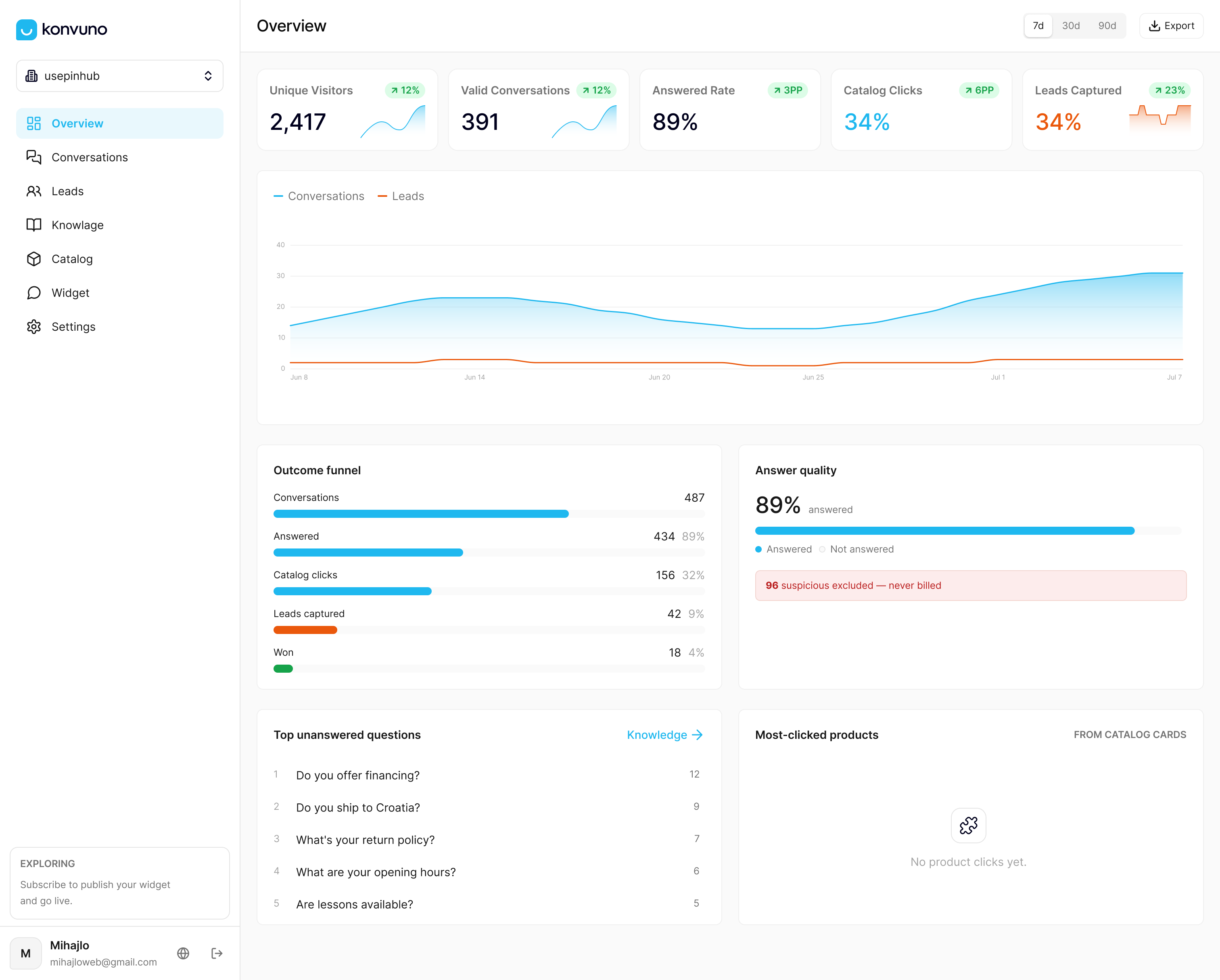
Plans are published at konvuno.com: Starter at 29 EUR per month, Growth at 79 EUR per month and Business at 199 EUR per month. You can configure and preview the assistant before paying. Our FAQ Assistant and Shop Connect pages show how the answering and catalog sync work. To see what to do with unanswered questions, read how to find chatbot content gaps from escalation logs and the list of top questions customers ask.
Keeping the analysis going
Turn the one-off audit into a routine:
- Weekly: skim new conversations and emails for questions with no good answer.
- Monthly: update your question sheet, re-score, and assign the top three fixes.
- After every product, price or policy change: check which answers just became outdated.
- Quarterly: retest the original questions and mark each gap improved, unchanged or unresolved.
If you are launching a pre-sales assistant, these copy-paste pre-sales questions give you a starting list. Tying gaps to your customer journey also helps: a short set of CRM lifecycle stages gives you stages to tag each question against.
FAQ
What is the difference between a knowledge gap and a skills gap?
A knowledge gap is missing information or understanding, such as not knowing a return policy. A skills gap is a lack of ability to perform a task, such as using software well. Knowledge can be applied once learned, while skills need practice.
How long does a knowledge gap analysis take for a small business?
For a site with a few dozen pages, two or three afternoons is realistic: one to collect and group questions, one to audit and score, and one to write the first fixes. The measuring step then repeats on a monthly or quarterly rhythm.
Where do I find customer questions if I have no support team?
Start with your inbox, contact form entries, social messages, site search terms and anything your sales or front-desk staff hear. A website assistant’s conversation log adds a steady stream of questions in visitors’ own words.
How do I know a gap is actually closed?
Repeat the original question or task the same way you first did, and check that the answer is found and used. Also watch support-question counts for that theme and Search Console impressions for matching queries.
Sources
- Mind the gap: how to conduct gap analysis
- What Is a Knowledge Gap and How to Fix It
- Knowledge and skills gap guide
- Identifying knowledge and skills gaps in your organisation
- Skills gap analysis guide
- Content gap analysis: a step-by-step guide
- Unbridged Knowledge Gaps Hurt UX
- Content Gaps That Reduce Business Website Enquiries
- How to find content gaps in your help center
- Understand what your users need
- How do you identify gaps between customer needs and existing content
- How to Run a Content Gap Analysis for AI Visibility
- Identify & Map Critical Knowledge (APQC)
- Content gap analysis: how to do one
- How to Use Customer Support Data to Plan Content
- How Can Organizations Assess KM Maturity (APQC)
- Enterprise Knowledge Search Gap Management