Small Teams: 10 Website Chatbot Best Practices, No Developer Needed
A practical 10 point checklist for small teams to launch a working website chatbot. Covers two tap flows, page aware greetings, measurable KPIs, a...

The single most important rule for website chatbots: scope them tightly, disclose that they are a bot, and measure resolution rate every month rather than after launch. Nielsen Norman Group’s usability research ties trust directly to capability transparency, and small-team deployments tracked by BotHero show that page-context greetings and two-tap flows beat generic setups by a wide margin. Use the shortlist below for a fast implementation pass, then work through the planning and measurement sections if you want the reasoning behind each rule.
TL;DR:
- Keep your chatbot scope narrow, clearly disclose it as an automated assistant, and measure resolution and handoff rates monthly for continuous improvement.
- Use page-specific greetings, quick-reply buttons, and responses under 60 words to enhance user engagement and reduce confusion.
- Automate knowledge base synchronization, set explicit support hours with clear escalation rules, and integrate seamlessly with your CRM and operational systems.
- Prioritize transparency about the bot’s abilities and confidence level, obtain user consent for data logging, and ensure accessibility standards are met from day one.
- Follow a phased rollout plan with continuous transcript reviews, iterative A/B testing, and targeted updates based on real visitor questions.
Table of Contents
- Website Chatbot Best Practices: A 10-Point Checklist
- Plan the Rollout: KPIs, Scope, and Who Owns What
- Conversation Design: Prompts, Brevity, and Graceful Failure
- Widget Design and Placement: Getting the Bot Noticed Without Being Annoying
- Measuring What Matters and Building a Real Improvement Cycle
- Privacy, Accessibility, and Ethical Guardrails From Day One
- The 30/60/90-Day Rollout Plan for Small Teams
- Konvuno in Practice: Mapping the Checklist to a Real Tool
- Chatbots Don’t Fail on the CRM, They Fail on Silence Between Systems
- Security Best Practices Specific to Chatbots
- What Good Chatbot Conversations Actually Look Like
- What I’ve Learned Watching Small Teams Build These
- How Konvuno Handles the Setup Work So You Don’t Have To
- Sources
Website Chatbot Best Practices: A 10-Point Checklist
Treat this as a working punch list, not a wish list. Each item below has a measurable target attached, because a chatbot without a target is just a chat window nobody’s watching.
- State the KPI before you write a single conversation flow. Resolution rate, lead capture rate, and handoff rate are the three that matter most.
- Disclose the bot upfront. A line like “I’m an automated assistant” costs nothing and builds trust immediately.
- Write a page-aware greeting. A visitor on a pricing page needs a different opening than one on a support article.
- Default to buttons, not blank text fields. Suggested prompts reduce the guesswork that kills first replies.
- Cap responses near 60 words. Longer answers get skimmed, not read.
- Design the fallback before the happy path. Recovery patterns prevent the worst conversations from becoming lost customers.
- Preserve context at handoff. Pass the full transcript to the human agent, every time.
- Aim for a sub-3-second response time. Anything slower feels broken on mobile.
- Review conversation logs monthly. Thirty minutes catches drift before it costs you leads.
- Sync your knowledge base automatically. Stale answers about prices or stock erode trust faster than a slow reply.
Plan the Rollout: KPIs, Scope, and Who Owns What
A chatbot built without a target metric tends to become a decorative feature that nobody maintains. Before writing a single line of dialogue, decide what “working” looks like in numbers.
Start with three to five KPIs, not fifteen. Resolution rate (the share of chats the bot closes without a human), lead capture rate (visitors who leave contact info), handoff rate (how often a human gets pulled in), and average exchanges per conversation give you a workable dashboard. Botpress frames this as a day-one requirement, not a post-launch nice-to-have, and recommends iterating against real usage data rather than guessing at what visitors want.
Next, pull your support logs and find the five to seven intents that account for most of your volume. Almost every small business discovers the same pattern: shipping questions, return policy, pricing, availability, and “how do I contact a human” cover 70 to 80 percent of what visitors actually ask. Build for those first. Resist the urge to design for every edge case before launch.
Scope your channels and hours honestly. Most small businesses should launch web-only before expanding to messaging apps. Decide your handoff rules now: does the bot escalate to live chat during business hours and collect an email after hours? Write that rule down before development starts, not during a launch-week scramble.
Assign four roles even if one person wears all four hats: a product owner who owns the KPIs, a conversation designer who writes the flows, an engineer who handles integrations, and a support lead who reviews transcripts. The Conversation Design Institute frames this as a circular workflow, define, design, train, test, deploy, maintain, rather than a one-time build.
- Pick 3 to 5 KPIs and write down the target number for each before launch.
- Audit six months of support tickets to find your top five to seven intents.
- Set explicit business-hours handoff rules and an after-hours fallback.
- Name one owner for the KPI dashboard, even in a one-person operation.
Pro Tip: Write your handoff rule as a plain sentence you’d say to a new hire: “If the bot can’t answer in two exchanges, or the visitor asks for a human, hand off immediately with the full transcript attached.” That sentence becomes your build spec.
Conversation Design: Prompts, Brevity, and Graceful Failure
Good chatbot design isn’t about sounding clever. It’s about resolving a task in the fewest possible steps while never leaving the visitor confused about what they’re talking to.
Lead every conversation with a plain statement of what the bot can and can’t do. NNGroup’s chatbot research names capability transparency as one of ten guidelines that materially affect whether users trust and keep using a chatbot, and MIT’s research on user expectations backs this up: how a visitor interprets a bot’s answer depends heavily on what they were told to expect going in. A greeting like “I can help with order status, returns, and product questions, what do you need?” sets the frame instantly.
Default to quick-reply buttons over open text fields, especially for the first exchange. Buttons remove the blank-page problem, where a visitor doesn’t know what phrasing will actually work. Reserve free-text input for follow-up questions once the bot has established context. This single change is often the difference between a bot that resolves a question in two taps and one that spirals into three rounds of clarification.
Keep every message under roughly 60 words. NNGroup’s usability findings and mobile UX testing both point to the same conclusion: shorter messages get read completely, while longer ones get skimmed and misunderstood, particularly on a phone screen. If an answer genuinely needs more detail, split it into a short first message with a “want more detail?” button rather than one dense paragraph.
- Open with a capability statement, not a generic “Hi, how can I help?”
- Use buttons for the first reply; open text for follow-ups.
- Cap messages at roughly 60 words; split longer answers into steps.
- Build the fallback message before you polish the happy-path flow.
- Show a confidence signal (“I’m not fully sure, but here’s what I found”) instead of guessing with false certainty.
Recovery design deserves as much attention as the ideal path. Fuselab’s UX research argues that teams routinely polish the happy path first and treat fallbacks as an afterthought, which is backwards: most real conversations wander off script at least once. A well-written fallback (“I didn’t quite catch that, do you mean X or Y?”) keeps the visitor engaged instead of typing in frustration. When a handoff to a human does happen, pass the entire transcript along. BotHero and Fuselab both flag context loss at the handoff moment as one of the fastest ways to lose a customer who was otherwise ready to buy or ask a real question.
A note on trust: visible uncertainty beats hidden uncertainty.
Widget Design and Placement: Getting the Bot Noticed Without Being Annoying
The best conversation flow in the world does nothing if visitors never click the widget open. Placement and timing decide whether your chatbot gets used at all.
Launcher design matters more than most teams assume. A recognizable icon with a subtle pulse or badge on load outperforms a plain silent button, but overdoing the animation reads as spammy. Avatar choice should match your brand’s tone. A friendly icon works for e-commerce; a neutral, professional mark suits B2B services.
Timing rules should vary by page and visitor type. A first-time visitor on your homepage can wait 10 to 15 seconds before a proactive greeting appears. A returning visitor on a pricing or checkout page, though, is showing clear intent and benefits from a faster, more specific prompt like “Questions about pricing? I can help.” BotHero’s audit of hundreds of live deployments found that greetings tailored to the page a visitor is actually on outperform generic openers by roughly 3.2 times in engagement.
- Use a notification badge to signal an unread message without forcing an auto-open pop-up.
- Preserve conversation history across page navigation and return visits.
- Auto-open sparingly, and never on the first page load for a brand-new visitor.
- Keep tap targets at least 44 by 44 pixels on mobile so the launcher doesn’t require a second attempt.
- Support dark mode so the widget doesn’t clash with a visitor’s device settings.
Mobile placement deserves its own pass. Bottom-right corner placement is the default for good reason: it doesn’t cover navigation menus or footer links, and thumbs reach it naturally. Test that your widget doesn’t overlap a mobile “add to cart” button or checkout field, a surprisingly common conflict that quietly kills conversions nobody notices until someone checks a session recording.
Measuring What Matters and Building a Real Improvement Cycle
A chatbot you never measure is a chatbot you’re guessing about. The teams that get real value treat the first month post-launch as data collection, not victory laps.
Botpress’s guidance on chatbot performance treats these three as the baseline any team should track from week one, adjusting the specific targets to match your traffic volume and intent mix.
Numbers alone won’t tell you why something’s failing. Pull a sample of transcripts weekly and look specifically at drop-off points, where visitors stopped responding or typed something the bot clearly misread. This qualitative pass usually surfaces problems no dashboard metric catches, like a button label that confuses more people than it helps.
- Week 1 to 2: Set your baseline. Don’t change anything yet; just watch the numbers.
- Week 3 to 4: Run your first A/B test, usually on greeting copy or trigger timing, since those have the fastest, cleanest read on results.
- Month 2: Test structured buttons against free-text input for your top two intents and compare completion rates.
- Every month after: Review the top ten unanswered or misrouted queries and update your knowledge base accordingly.
Pro Tip: Block 30 minutes on the calendar, same day every month, just for transcript review. BotHero’s audit work found this cadence realistic for small teams and enough to catch knowledge drift before it shows up as a falling resolution rate.
Privacy, Accessibility, and Ethical Guardrails From Day One
Trust breaks fast when a visitor feels tricked or excluded, and both are avoidable with a handful of decisions made before launch rather than after a complaint.
Tell visitors what they’re talking to and how confident the bot’s answers are likely to be. A short disclosure, “This is an automated assistant; for complex issues I’ll connect you with our team”, sets honest expectations and aligns with the transparency principle NNGroup’s usability guidelines treat as foundational to chatbot trust.
Get consent before logging conversations, and set a clear retention window rather than storing transcripts indefinitely by default. If your bot touches anything resembling personal or sensitive information, this matters even for a small business, not just enterprises with legal teams. Guidance built for nonprofits navigating AI compliance applies just as directly to a small e-commerce shop collecting emails through a chat widget.
Accessibility is not optional polish. Meet basic WCAG expectations: sufficient color contrast on the widget, full keyboard navigation so a visitor can operate the chat without a mouse, and screen-reader labels on every button and input field.
- Disclose bot identity and rough accuracy expectations in the first message.
- Set a clear data retention window and get consent before logging chats.
- Test keyboard navigation and screen-reader labels before launch, not after a complaint.
- Build safe, honest fallbacks for medical, legal, or financial questions the bot shouldn’t attempt to answer.
- Review transcripts periodically for skewed or unfair responses; HBR’s research on AI bias recommends cross-functional review rather than leaving this to one engineer.
The 30/60/90-Day Rollout Plan for Small Teams
Rolling out a chatbot without a phased plan tends to produce either a rushed launch or a project that never quite ships. Break it into three stages with clear ownership at each one.
- Before launch: Test your top five to seven intents end to end, confirm handoff routing actually reaches a human, and get sign-off from whoever owns customer support.
- Launch day: Watch the first fifty conversations live if you can. Fix broken buttons or confusing fallback messages immediately rather than waiting for the weekly review.
- Day 30: Review resolution rate against your baseline target and fix the top three misunderstood questions.
- Day 60: Run your first A/B test on greeting copy or trigger timing.
- Day 90: Expand intent coverage based on what transcripts show visitors actually asking, not what you assumed they’d ask.
| Timeframe | Priority action | What to watch |
|---|---|---|
| Days 1 to 30 | Fix broken flows, confirm handoff routing | Resolution rate baseline |
| Days 30 to 60 | A/B test greeting and trigger timing | Engagement rate change |
| Days 60 to 90 | Expand intent coverage from transcript data | Lead capture rate |
Three fixes tend to produce the largest lift for the least effort: a page-context greeting instead of a generic one, a two-tap path to the most common answer, and a handoff message that passes full context to the human agent. Nail those three before chasing anything more ambitious.
Konvuno in Practice: Mapping the Checklist to a Real Tool
A checklist is only useful if it’s achievable without a development team, and that’s the gap Konvuno is built to close for small and medium businesses.
Installation happens through a single script tag, which covers the “launch fast, iterate faster” principle directly instead of leaving it as an aspiration. The FAQ Assistant answers from your existing FAQs and website content, so your top five to seven intents get covered without writing conversation flows from scratch. For e-commerce sites, Shop Connect syncs your WooCommerce or Google Merchant feed automatically, which solves the stale-pricing problem that quietly erodes trust in manually maintained bots.
A typical flow looks like this: a visitor asks about return policy, the FAQ assistant answers directly from synced content, the conversation captures an email into the built-in CRM, and if the question turns complex, it hands off to a human with full context preserved. Multilingual support across seven languages extends the same flow to international visitors without a separate build for each market.
Chatbots Don’t Fail on the CRM, They Fail on Silence Between Systems
A chatbot that can’t see your CRM data or update it after a conversation ends up creating extra manual work instead of removing it, which defeats the entire point of automating the front line of visitor questions.
The core integration to get right first is lead sync: every captured email, phone number, or inquiry should land in your CRM automatically, tagged with the conversation context that produced it, not dumped into a spreadsheet someone has to reconcile weekly. If your chatbot platform includes a built-in CRM, this step disappears entirely rather than requiring a separate integration project.
Beyond lead capture, connect the systems that hold the answers your bot needs to give. An inventory system feeding stock status, an order management platform for shipping status lookups, and a knowledge base for policy questions all need to stay current without manual re-entry. The deep knowledge finding from BotHero’s deployment audits is worth applying here too: split your knowledge base into small, specific chunks rather than feeding whole FAQ pages into the bot’s prompt. Smaller chunks retrieve faster and more accurately than dumping an entire policy document at once.
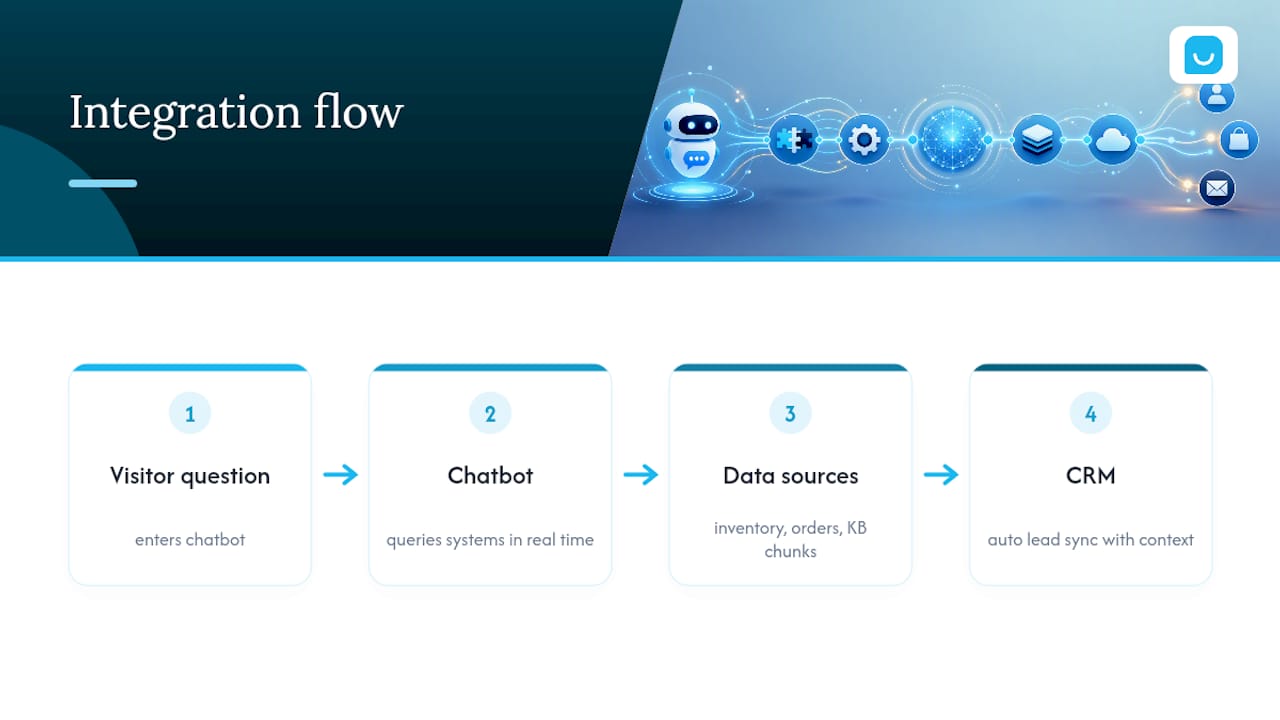
Test every integration with a real transaction before launch, not a sandbox record. A shipping lookup that works in a demo environment but fails against your live order system will surface on day one, usually from your most frustrated customer.
Security Best Practices Specific to Chatbots
A chatbot sits at the front door of your website, which makes it a target worth securing properly rather than an afterthought bolted on after launch.
Encrypt data in transit and at rest, particularly anything captured through lead forms or account lookups inside the chat window. If your bot can pull order details or account information, verify the visitor’s identity before revealing anything sensitive, a name and order number at minimum, rather than assuming anyone who asks is who they claim to be.
Limit what the bot can access. A chatbot connected to your CRM doesn’t need write access to every field, and one connected to your product catalog doesn’t need access to customer payment records. Scope API permissions narrowly, the same principle any security team applies to employee access levels.
Watch for prompt injection, a newer risk specific to AI-driven bots where a visitor tries to manipulate the bot into ignoring its instructions or revealing internal configuration. Test your bot with adversarial inputs before launch: ask it to ignore its rules, reveal its system prompt, or perform actions outside its intended scope. A well-configured bot should decline gracefully every time.
Log access to sensitive integrations separately from general conversation transcripts, and review that access log on the same cadence you review conversation quality. Rate-limit API calls to prevent a single visitor session from triggering unusual backend load, whether from a bug or a deliberate attempt to strain your systems.
What Good Chatbot Conversations Actually Look Like
Reading about best practices only goes so far. Seeing the difference between a clumsy exchange and a well-designed one makes the principles concrete.
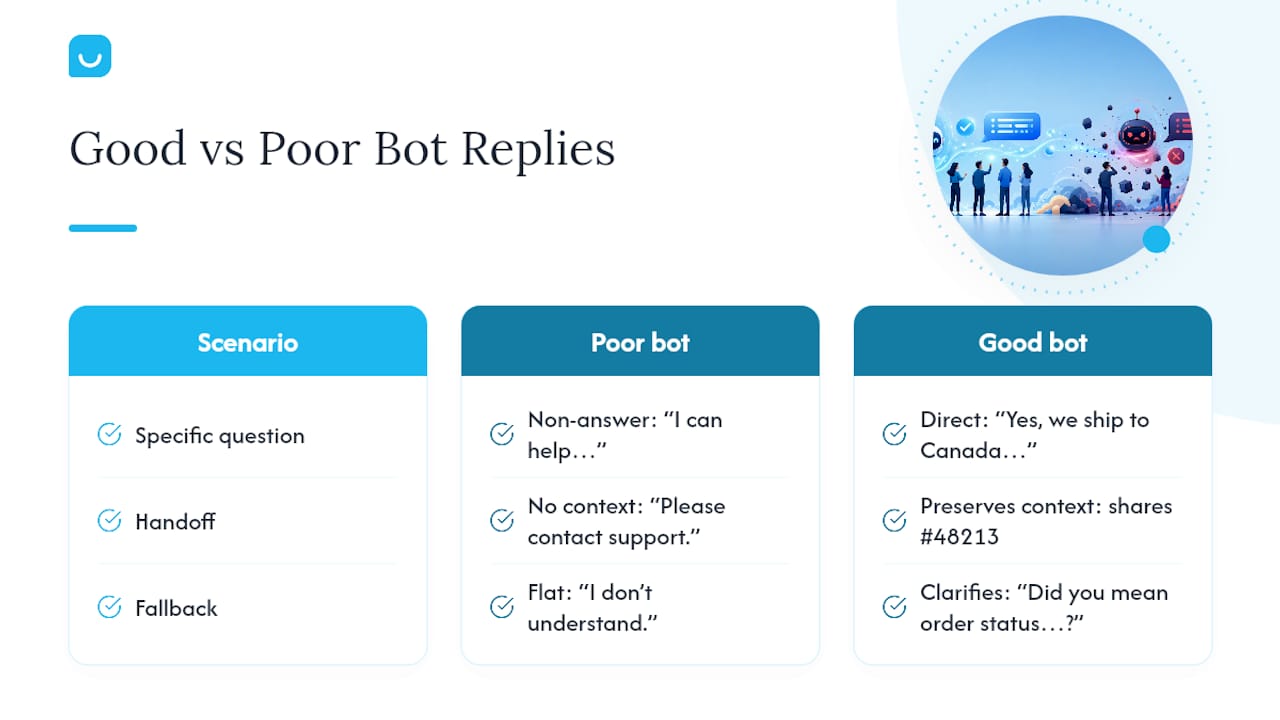
A poorly scoped bot response to “Do you ship to Canada?” might read: “I can help you with a variety of questions about our products and services. What would you like to know?” That’s a non-answer dressed up as helpfulness, and it will frustrate a visitor who asked something specific.
A well-designed version answers directly: “Yes, we ship to Canada. Standard delivery runs 5 to 7 business days, and there’s a flat $12 shipping fee for orders under $75. Want me to check delivery time for your specific location?” That response resolves the question, offers a clear next step, and stays under the 60-word guideline.
Handoff moments separate good bots from frustrating ones. A weak handoff says: “I’m not able to help with that. Please contact support.” A strong one preserves context: “This needs a specialist’s help, connecting you now. I’ve shared your question about the delayed order (#48213) so you won’t have to repeat it.” That single sentence, referencing the order number and passing context forward, is what BotHero’s research on handoff quality flags as the detail most bots skip and most customers notice.
Fallback language matters just as much. Instead of a flat “I don’t understand,” a better fallback offers a path forward: “I’m not sure I caught that. Did you mean order status, returns, or something else?” It turns a dead end into a second chance at resolution.
What I’ve Learned Watching Small Teams Build These
Most chatbot failures I’ve seen trace back to one habit: teams build the happy path first and treat the fallback as a five-minute afterthought, then wonder why real conversations feel broken. Budget realistically. A tight, well-scoped launch takes a few weeks, not a weekend, and the first month afterward matters more than the build itself. That’s when you find out what visitors actually ask.
— Konstantin
How Konvuno Handles the Setup Work So You Don’t Have To
Everything in this checklist, tight scope, page-aware greetings, fast handoff, monthly maintenance, gets harder to execute the more manual work it demands from a team with no developer on staff. Konvuno is built specifically to close that gap: install a single script tag, connect your FAQs and product feed, and the assistant starts answering from your own content within minutes, no conversation-flow scripting required.
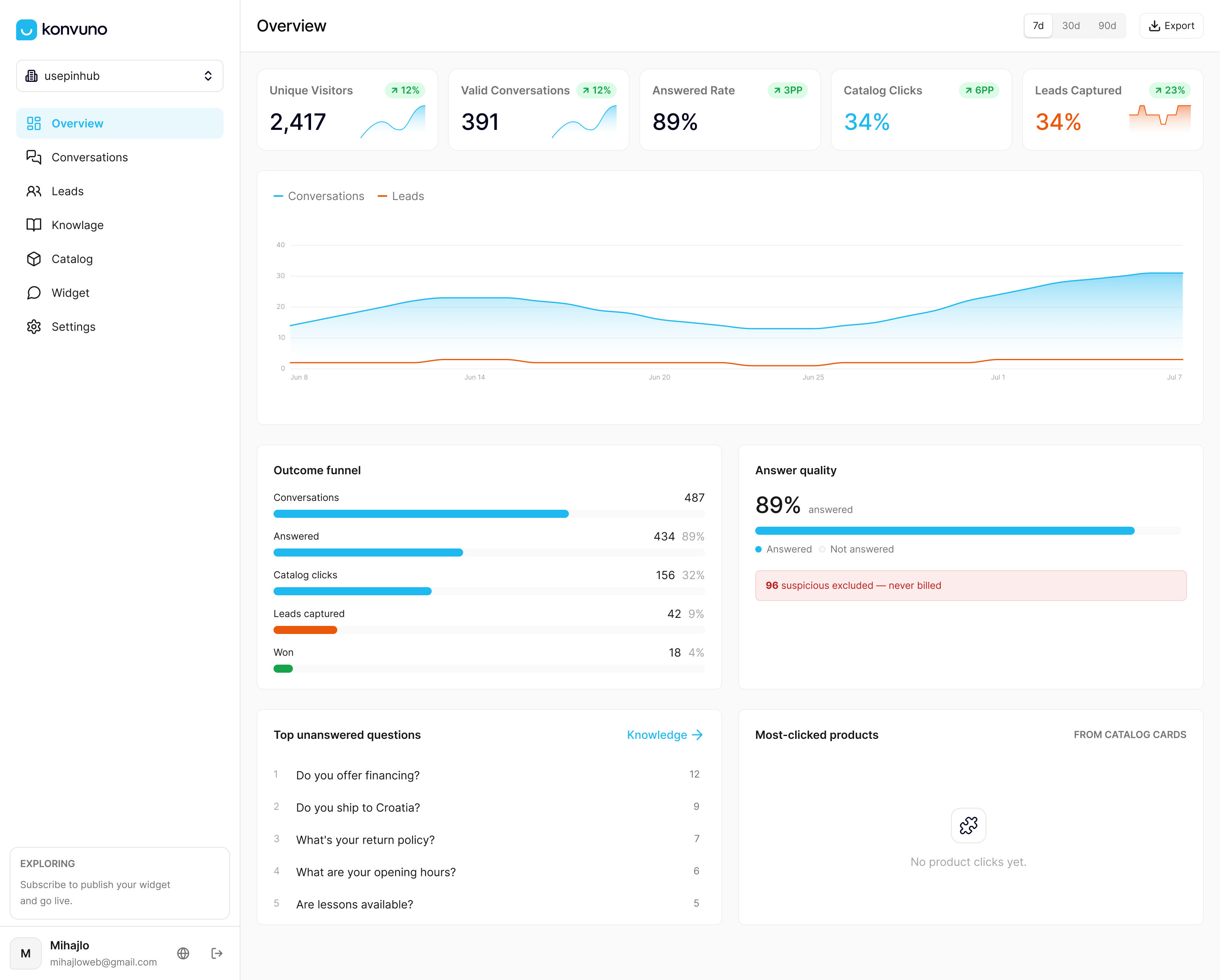
It fits best for small to medium e-commerce and service businesses that want a working chatbot now, not a three-month development project. The Shop Connect feature keeps product and pricing answers accurate automatically by syncing with WooCommerce or your Google Merchant feed, solving the stale-data problem that undermines trust in manually updated bots. Every captured lead lands in Konvuno’s built-in CRM with conversation context attached, and when a question needs a human, handoff happens with the full transcript intact. Visit Konvuno to see the dashboard and start a trial on your own site.
Sources
- Website Bot Best Practices: 7 Proven Tips for 2026 | BotHero
- Chatbot UI design patterns and best practices (Fuselab)
- What do we do about the biases in AI? (Harvard Business Review)