8 Website Chatbot Case Studies With Real Numbers and 5–6 Week Launches
Eight website chatbot case studies with real metrics, a 5–6 week rollout plan, and how to get 10–35% conversion lifts and 80%+ support cuts.

Website chatbots regularly produce measurable gains, not just softer ones. StubHub cut customer wait times from over 20 minutes to near-instant with a Claude-based assistant, Lyft reported an 87% drop in resolution time after deploying an AI assistant, and vendor case libraries routinely cite conversion uplifts between 10% and 35% when chat replaces static lead forms. Eight case studies below break down what worked, the metrics behind it, and what to copy.
TL;DR:
- Replacing static forms with conversational chatbots can boost lead conversion rates by 10% to over 35 percent, especially when more than four fields exist.
- AI assistants have cut support ticket wait times from over 20 minutes to near-instant and reduced resolution times by approximately 87 percent.
- Automated triage and knowledge base integration enable chatbots to handle up to 80 percent of routine questions, freeing human agents for complex cases.
- Fast, easy setup involves connecting existing FAQs and product feeds, with most implementations going live within five to six weeks without heavy development.
- Tracking key performance indicators like lead capture, response time, and ticket deflection is essential for measuring long-term chatbot success.
Table of Contents
- At-a-Glance: Website Chatbot Case Studies by Use Case
- 8 Website Chatbot Case Studies With Real Numbers
- What These Chatbot Case Studies Have in Common
- How to Measure Whether Your Chatbot Is Actually Working
- A 5 to 6 Week Rollout Plan and the Mistakes That Slow It Down
- Why the Widget-Plus-Dashboard Model Changes the Calculus
- Get the Same Kind of Results Without the Integration Work
- Sources
At-a-Glance: Website Chatbot Case Studies by Use Case
Each mini case study below is tagged by primary use case so you can jump to the one closest to your situation. They’re organized roughly from lead generation through customer service into sales and onboarding, since that’s the order most site owners move through as their chatbot matures.
Here’s what the eight cases deliver, in one line each:
- Lead generation, e-commerce: conversational qualification replacing a static form lifted conversion by double digits.
- Customer support, marketplace: ticket wait times dropped from over 20 minutes to near-instant.
- Customer support, rideshare: resolution time fell by roughly 87%.
- Sales, SaaS onboarding: proactive chat prompts moved trial users to activation faster.
- Appointment booking, services: chat-based scheduling reduced no-show follow-up work.
- Product discovery, retail: catalog-aware answers cut “is this in stock” tickets.
- Multilingual support, hospitality: language coverage widened qualified inquiries.
- Knowledge-base deflection, B2B: repetitive FAQ traffic got absorbed before reaching a human.
Read on for the specifics behind each number, including how the result was measured and what to replicate.
8 Website Chatbot Case Studies With Real Numbers
1. E-Commerce Lead Qualification Replaces a Static Form
Problem: A retail site was losing visitors at a multi-field contact form before they ever reached a human. Approach: A web widget replaced the form with a short conversational flow that qualified intent (budget, product interest, timeline) before routing to sales. Result: Case libraries covering this pattern report conversion uplifts in the 10% to 35%+ range when chat replaces forms or adds qualification steps. Takeaway: Forms filter people out. Conversation filters people in. If your form has more than four fields, that’s a chatbot opportunity.
2. Marketplace Support Goes From 20-Minute Waits to Instant
Problem: StubHub’s support queue routinely kept customers waiting more than 20 minutes for routine ticket issues. Approach: A Claude-based assistant handled ticket flows end-to-end, pulling from existing support documentation via retrieval rather than a scripted decision tree. Result: Wait times dropped to near-instant, and support costs fell as the assistant absorbed high-volume, low-complexity tickets. The first use case reportedly launched in about six weeks.
3. Rideshare Support Cuts Resolution Time by 87%
Problem: Lyft’s support team was buried in resolution time on cases that didn’t need a human’s judgment. Approach: An AI assistant handled first-pass triage and resolution, escalating only decisions that required nuance. Result: Resolution time fell by roughly 87%, and decision accuracy improved because agents could focus their attention on genuinely complex cases instead of splitting it across everything. Takeaway: Speed and accuracy aren’t a tradeoff here. Automating the routine cases actually made human judgment sharper on the hard ones.
4. SaaS Trial Activation Gets a Proactive Nudge
Problem: Free trial users were signing up and then going quiet before reaching an “aha” moment in the product. Approach: A proactive welcome message triggered on key pages, offering to walk the visitor through setup or answer a specific feature question instead of waiting for them to ask. Result: Case write-ups grouping onboarding flows this way point to meaningful upticks in activation when the chatbot initiates contact rather than sitting passive in the corner. Takeaway: A chat widget that waits to be clicked underperforms one that speaks first at the right moment.
5. Service Business Books Appointments Without Phone Tag
Problem: A local services company was losing bookings to phone tag and email delays. Approach: A widget handled availability questions and pushed qualified visitors straight into a booking flow, syncing with the business’s calendar. Result: Fewer manual follow-ups were needed per booked appointment, since the qualifying questions (service type, location, timing) got answered before a human ever touched the lead. Takeaway: Booking flows work best when the chatbot asks the same three or four questions your staff always ask anyway.
6. Retail Product Discovery Cuts Stock-Check Tickets
Problem: A significant share of support tickets were simple product availability or price questions that any current catalog feed could answer. Approach: The chatbot synced directly with the store’s product feed, so it could answer “is this in stock” or “what’s the price” without a human touching the ticket. Result: Case libraries that group examples by use case highlight product-catalog integration as the difference between a chatbot that guesses and one that’s actually reliable on inventory questions. Takeaway: A chatbot answering from stale FAQ text will eventually give a wrong price. One synced to a live feed won’t.
7. Hospitality Widens Reach With Multilingual Coverage
Problem: An international hospitality site was fielding inquiries in languages its support team didn’t cover during off-hours. Approach: A multilingual assistant handled first-contact questions in the visitor’s own language, then handed off to a human agent when the conversation needed a person. Result: Qualified inquiry volume grew as language stopped being a barrier to getting a basic question answered. Takeaway: If your site draws international traffic, language coverage is often a bigger lever than adding more agents.
8. B2B Knowledge Base Deflects Repetitive Questions
Problem: A B2B site’s support inbox was clogged with the same handful of questions, answered fresh every time by a person. Approach: The chatbot pulled directly from the existing knowledge base and FAQ pages, deflecting repeat questions before they reached a support queue. Result: Agents spent less time typing the same answer and more time on tickets that actually needed judgment, with AI-generated summaries improving handoff quality when escalation was needed. Takeaway: Your existing FAQ page is probably your best chatbot training material, and it’s likely underused.
What These Chatbot Case Studies Have in Common
Look across all eight and four tactics keep showing up. Sites that swapped a lead form for a conversational funnel saw the clearest before-and-after lift. Proactive welcome messages, triggered at the right moment on the right page, outperformed passive widgets waiting for a click. Qualification-plus-booking flows shortened the distance between “interested” and “on the calendar.” And catalog-aware responses kept product answers accurate without a human checking every question.
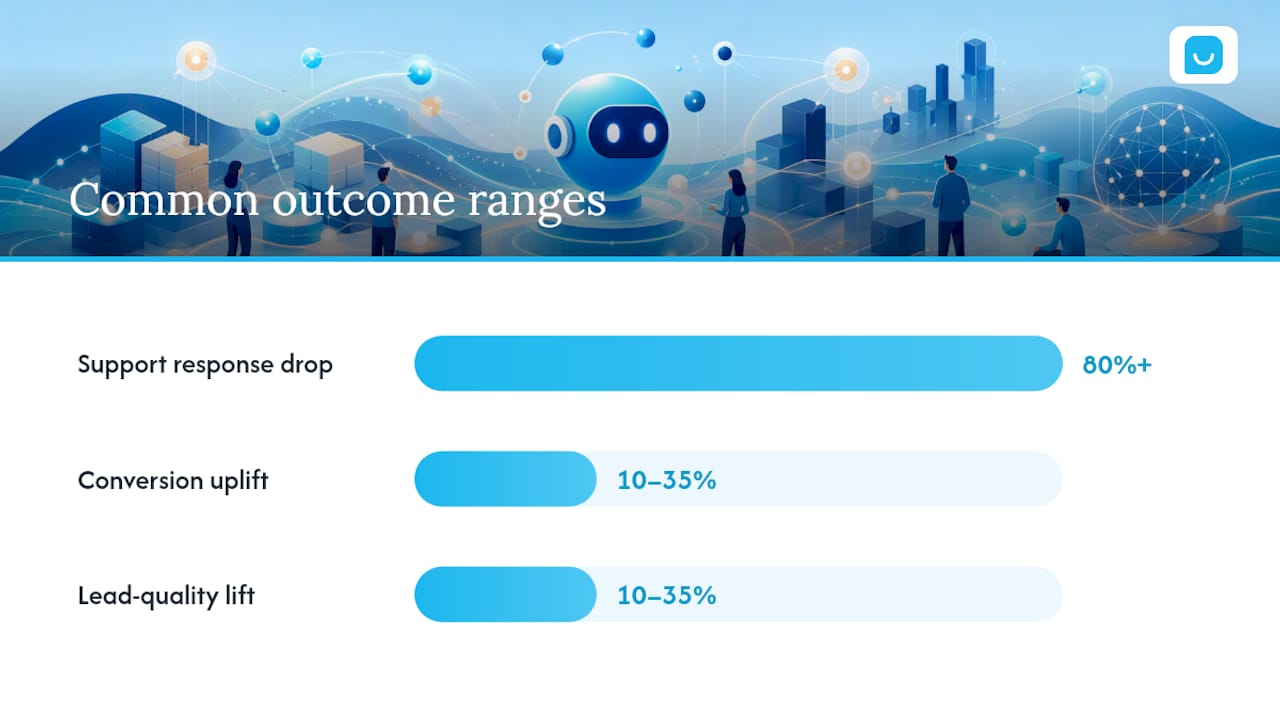
The pattern in the numbers: response-time reductions cluster in the 80%+ range for support use cases, while conversion and lead-quality improvements from replacing forms with chat tend to land in the 10% to 35% range, depending on how qualified the previous form flow was.
Three things separated the cases that worked from the ones that probably didn’t make it into a case study at all:
- Knowledge-base and product-feed integration, so answers stayed accurate without manual updates.
- Clear handoff rules that routed a confused or frustrated visitor to a human fast, instead of trapping them in a loop.
- Ongoing measurement rather than a “set it and forget it” launch. Teams that tracked chat-to-lead conversion kept improving after week one.
None of this works by accident. The businesses behind these numbers treated the chatbot as a measured system, not a one-time install.
How to Measure Whether Your Chatbot Is Actually Working
You need a short list of KPIs, not a dashboard with forty metrics nobody checks:
- Leads captured and chat-to-lead conversion rate, tracked weekly.
- Conversion lift, compared against your prior form or no-chat baseline.
- Response time, especially for first contact.
- Ticket deflection rate, meaning the share of questions resolved without a human.
- CSAT or NPS on chat interactions specifically, not just site-wide surveys.
Run a basic A/B test if your traffic supports it: split visitors between the best AI customer service software chatbot experience and your current form or static FAQ page for two to four weeks, holding everything else constant. Compare conversion and lead quality, not just volume. A lead form quietly generates more submissions than a chatbot which are actually worse leads.
For attribution, tag chat-originated leads in your CRM at the moment of capture, so you can trace them through to closed revenue later instead of guessing which pipeline deals started as a chat conversation.
Pro Tip: Run your test in two-week increments rather than trying to judge results after a few days. Chat behavior shifts as return visitors get used to seeing the widget, and a five-day sample almost always overstates or understates the real effect.
A 5 to 6 Week Rollout Plan and the Mistakes That Slow It Down
A focused chatbot launch doesn’t require a six-month platform build. Practitioners running retrieval-based pilots report going live on a scoped use case in roughly five to six weeks when the pilot pulls answers from existing knowledge bases and product feeds instead of requiring a rebuild.
A realistic week-by-week shape looks like this:
- Weeks 1 to 2: Define goals and KPIs, gather your FAQ and product-feed sources.
- Week 3: Connect the knowledge base and set up CRM lead routing.
- Week 4: Configure handoff rules for when a human needs to step in.
- Week 5: Soft launch with analytics running, then review real conversations.
- Week 6: Adjust based on what visitors actually asked, and go live fully.
The mistakes that slow this down: skipping measurement entirely, leaving handoff rules vague so frustrated visitors get stuck, and over-automating questions that genuinely need a person’s judgment.
Why the Widget-Plus-Dashboard Model Changes the Calculus
Most of the friction in these case studies didn’t come from the AI itself. It came from integration work: connecting knowledge bases, syncing product data, wiring up handoff rules. A single widget install with everything else configured from a hosted dashboard exists specifically to cut that friction, since it answers from existing FAQs, site content, and synced product catalog without a developer involved.
A few things worth stating plainly:
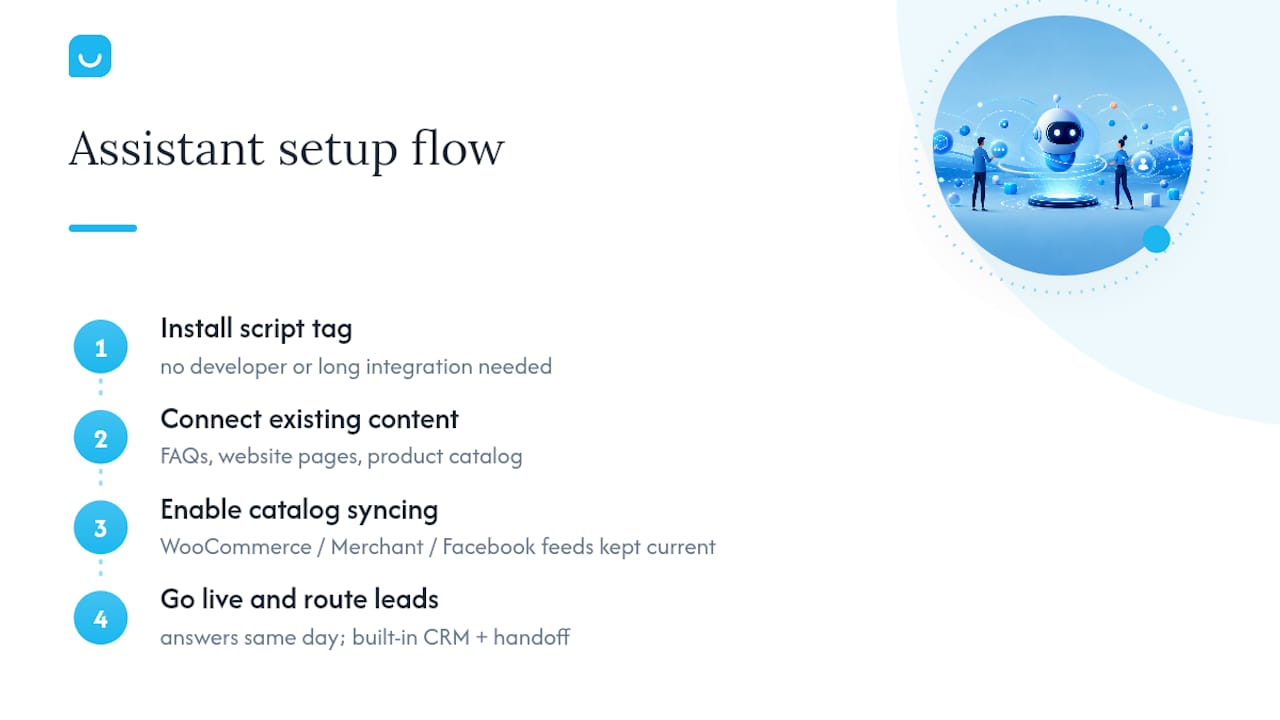
- The widget installs with a single script tag, no development work required.
- Product catalogs can sync automatically from WooCommerce, Google Merchant, or Facebook product feeds.
- The assistant supports multiple languages.
- Captured leads land in a built-in CRM, with human handoff available when a question needs a person.
A lightweight widget like this fits businesses whose knowledge already lives in a website, FAQ page, or product feed. A heavier custom integration makes more sense for businesses running proprietary internal systems a widget can’t read directly. Either way, the pattern across the eight cases above holds: accurate source data plus clear handoff rules is what turns a chatbot from a novelty into a measurable channel.
Get the Same Kind of Results Without the Integration Work
Every case study above shares a common thread: the wins came from a chatbot that answered accurately from real data and routed leads without friction. That’s the exact gap this kind of assistant is built to close. It pulls answers straight from FAQs, website content, and product catalog, captures qualified conversations into a built-in CRM, and hands off to a person automatically when a visitor needs one.
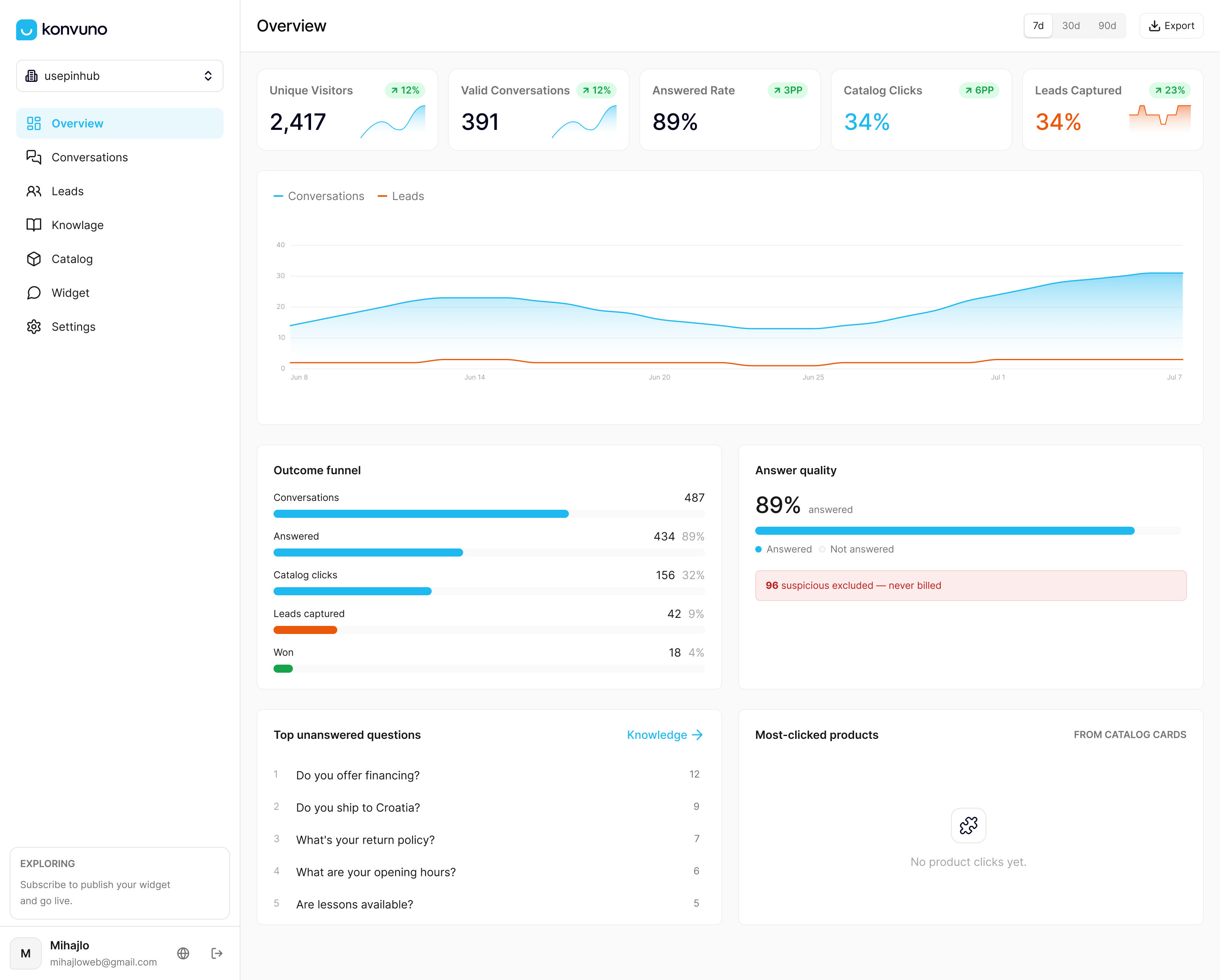
Setup doesn’t require a developer or a six-week integration sprint. You install one script tag, connect your existing content, and the assistant is answering visitor questions the same day. If you run a WooCommerce store or manage a Google Merchant or Facebook product feed, catalog syncing keeps prices and availability current without any manual updates on your end. For businesses whose visitors mostly need direct answers pulled from existing content, the FAQ assistant feature covers that exact case.
If the results in these case studies look like what your site is missing, start with a demo of Konvuno and see how it answers questions pulled from your own site within minutes of setup.
Sources
The metrics and rollout guidance above draw on the following primary sources, worth reading in full if you want the underlying detail: